
Managing 10+ Clients Is a Workflow Problem
Getting your first few social media clients feels manageable.
You know every account. You can keep most things in your head. A few Slack messages, a spreadsheet, and a content calendar are enough.
Then you hit 10 clients.
Suddenly, someone is asking why yesterday’s post wasn’t published, a designer is waiting for feedback, three clients need approvals, and your team can’t remember which version of a caption is final.
At that point, working harder isn’t the solution.
You need a system that can handle the volume without relying on memory.
1. Give Every Client a Repeatable Workflow
Your agency should not reinvent its process every time a new client signs.
Create a standard path for every account:
Strategy → Content Planning → Production → Internal Review → Client Approval → Scheduling → Publishing → Reporting
The details can change by client. The workflow shouldn’t.
This makes onboarding easier, training easier, and problems easier to diagnose.
If a post is late, you should be able to identify exactly where it got stuck.
2. Separate Client Work Clearly
Ten clients means ten different brands, strategies, audiences, approval preferences, and publishing schedules.
Mixing them together is asking for mistakes.
Your system should make it easy to see:
Which client a post belongs to
Which platforms they use
What’s scheduled
What’s waiting for approval
What needs revisions
Who on your team owns the next step
Context switching is expensive.
The less time your team spends figuring out where something belongs, the more time they have to actually produce good work.
3. Stop Managing the Agency Through Messages
Messages are useful for conversations.
They’re terrible as a project management system.
If a client sends revision feedback through email, the account manager forwards it to a designer, the designer asks a question in Slack, and the final file ends up in Google Drive, you’ve created a workflow that depends on people remembering what happened.
Instead, turn feedback into an actual task.
For example:
Client requests change → Task assigned to designer → Revision completed → Account manager reviews → Client approves → Post scheduled
Now the work has a visible path instead of disappearing into conversations.
4. Build a Real Approval System
At 10+ clients, approval delays become one of your biggest operational bottlenecks.
Don’t simply send clients a giant folder of content and ask them to “take a look.”
Give them a defined review process.
Content should have clear statuses such as:
Draft → Internal Review → Client Review → Changes Requested → Approved → Scheduled → Published
This tells your team exactly what needs attention without someone having to ask for an update.
It also gives clients a much simpler job: review the content and approve it or request changes.
5. Reduce Repetitive Work
Managing more clients shouldn’t mean manually repeating the same actions 10, 20, or 50 times.
Look for opportunities to automate the repetitive parts:
Generate first-draft captions with AI
Reuse content across relevant platforms
Schedule approved posts in batches
Automatically move work between workflow stages
Keep team tasks connected to the content they belong to
Automation isn’t about replacing your team.
It’s about stopping skilled people from spending their day doing administrative work.
6. Use One Operational Layer
You can technically manage 10+ clients with spreadsheets, cloud storage, messaging apps, a scheduler, and a project management tool.
The problem is what happens between them.
Every handoff creates another opportunity for something to get lost.
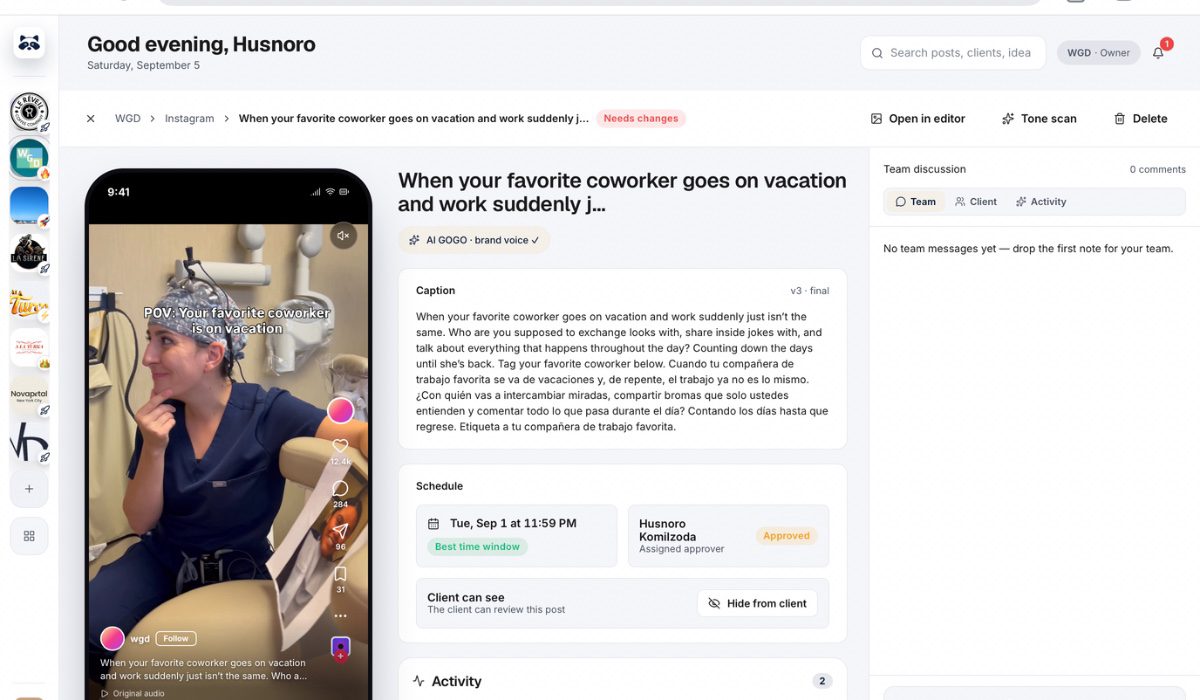
GoGoHype is designed around this exact agency problem. It brings multi-client management, content approvals, team tasks, AI caption generation, and publishing across 8 social platforms into one workflow.
That means your team can move from content creation to approval to publishing without constantly jumping between disconnected systems.
Scale the Process Before You Scale the Client List
The biggest mistake an agency can make at 10+ clients is treating every new account as another pile of work.
It shouldn’t be.
A new client should enter a system that already works.
If your workflow is organized, adding client #11 shouldn’t require reinventing your entire operation. It should mean adding another account to a process your team already understands.
More clients should increase revenue—not the amount of chaos in your Slack messages.
If you’re approaching 10+ clients and your current workflow is starting to break, take a look at GoGoHype and see whether it can simplify the way your agency operates.